






Pay-per-view live streaming

Sell tickets to your live stream. Set up pay-per-view in about 5 minutes.

  • Free test streams
  • No credit card needed
A speaker presenting on a conference stage in front of an audience

How it works

  1. Create and set a price

    Create the event, connect your Stripe account and choose a ticket price. It takes a few minutes.
  2. Share the link

    Post the event link anywhere. Viewers buy a ticket right on the page, with no app needed. Or embed it into your own website.
  3. Go live

    Stream from a phone with the EventLive app, or from your cameras and encoder over RTMP.

Tickets your way

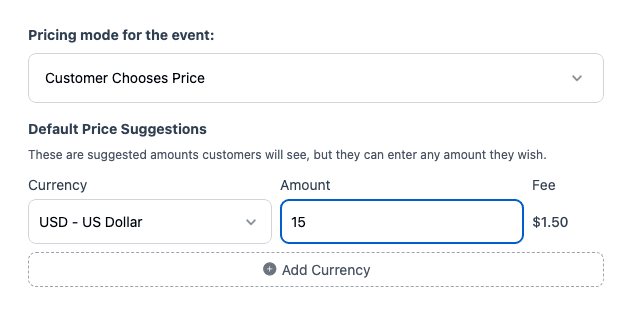
EventLive's ticket pricing set to Customer Chooses Price, with a suggested amount

Set a price in any of 31 currencies, use a price you already have in Stripe, or let viewers choose what to pay. How ticket sales work

Why sell tickets with EventLive

Sell tickets to any event you can stream

Concerts, conferences, sports, theater, dance recitals, classes, galas and workshops. Each event gets its own branded ticket page with your logo and a welcome message. See our pages for concerts and sports, and 7 ways to make money live streaming events.

Try It Free
Four ticketed live events: a band on a club stage, a volleyball match, a speaker at a conference and a contemporary dance performance

Keep selling after the event

When the live stream ends, the event page keeps selling. New buyers pay for the replay, at your ticket price or a separate replay price, and watch on demand. About replays

Try It Free
A man at his kitchen table in the evening, watching a recorded conference talk on a laptop and taking notes

Tickets and donations on one page

Running a benefit? Add a nonprofit fundraiser powered by Pledge. A Donate button appears under Get Tickets, so people who can't attend can still give, and every donor gets a tax receipt. How fundraising works

Try It Free
A phone on a small tripod live streaming the speaker at a charity gala

A phone or your pro gear

Go live from a phone with the EventLive app for iOS or Android, from a computer with EventLive for Windows or Mac, or over RTMP from OBS, an encoder, a video switcher or a streaming camera. Streaming for a client? Send them a link to connect their own Stripe account. How to go live using RTMP

Try It Free
A camera operator live streaming a band on the main stage of an outdoor festival at dusk, with a second stage in the distance

What organizers say

Pricing for ticketed events

Event credits

Pay as you go
$59
$59 per event
5 events
$250
$50 per event
10 events
$400
$40 per event
25 events
$875
$35 per event
50 events
$1,500
$30 per event

Unlimited plans

AnnualSave $389/yr
$167
/month
Billed at $1,999/yr

Pay-per-view tickets

US $1.50

per ticket sold, plus Stripe's card processing fee

Set Up a PPV Event
  • Ticket money goes to your own Stripe account
  • Fixed or pay-what-you-want prices
  • Day passes, all-days passes and replays
  • No contract and no revenue split

Every event includes

  • 24 hours of Full HD streaming
  • Unlimited guests
  • Pause and resume to the same link
  • Play the music your event needs
  • Instant replay, online from 1 month to 10 years
  • Your own event link and page
  • Link to gift registries or donations
  • Photo guestbook or chat
  • Welcome message, cover photo or intro video
  • Automatic email reminders for guests
  • Guest emails with your logo
  • Embed the stream on your website
  • Optional password protection
  • Money-back guarantee
  • Invite by CSV, link or email
Compare business streaming platforms

Planning a ticketed event?

Tell us about it and we'll reply by email. You can create your account and run a test stream in the meantime.

  • Ticket prices, day passes and payouts
  • Several stages or rooms on one ticket
  • Selling tickets for a client's event

Rather start now? Create a free business account

Frequently asked questions

Connect your Stripe account in Sell Tickets. If you don't have one yet, it's free to create. Viewers pay on your event page through Stripe, and the money goes straight to your Stripe account.

EventLive charges US $1.50 per ticket plus Stripe's card processing fee, on top of the event credit or plan you use to stream. With fixed prices, you can add the fees at checkout so buyers pay them. See PPV event fees.

Yes. In Sell Tickets, choose Copy Link to Connect Stripe Account and send it to your client. They sign in to their own Stripe account, so the ticket money goes to them, and they don't need your EventLive login.

Yes. With fixed prices, you can offer single-day tickets next to a pass for all days. A day ticket works for 24 hours from that day's scheduled start.

Yes, if the replay is on for your event. New buyers pay your ticket price, or a separate replay price if you set one. A Live-Only event has no online replay.

Yes. A multi-room event streams up to 10 rooms on one link. One ticket can cover every room, or each room can sell its own ticket. How multi-room events work

Yes. Add their email in Guest List & Invite, and they can watch without buying a ticket.

A ticket plays on one device at a time. If it's opened on a second device, the first one is disconnected.

Yes. Add a nonprofit fundraiser powered by Pledge. The ticket page shows a Donate button under Get Tickets, and ticket holders see it beside the video. Donations go to the nonprofit, not to EventLive. How fundraising works

Start selling tickets to your live stream

Create your event, connect Stripe and share the link. You can test your stream for free before you go live.