



Sell videos online with pay-per-view

Sell tickets to your on-demand video: upload the recording of your concert or show, set a price and share one link. Fans watch on any screen, and the money goes to your Stripe account.

  • Free test streams
  • No credit card needed
An orchestra and its conductor performing on the stage of a concert hall, seen from the audience

Sell your show in three steps

  1. Create the event

    Add the show’s name, date and cover. Connect Stripe and set the ticket price.
  2. Upload the video

    In Manage Video, choose Upload an on-demand pay-per-view video and add your MP4 or MOV file, up to 200 GB. Add a free trailer too, if you like.
  3. Share the link

    Post your event link anywhere or embed it on your website. Fans buy a ticket and start watching straight away.

Everything you need to sell a recording

No live stream and no schedule: fans buy a ticket and watch any time, on a page with your show’s name and cover.

A free trailer sells the show

Upload a trailer or a highlight as a free preview. Everyone can play it on your ticket page before they buy, and ticket holders get the whole show.

Try It Free

Several videos, one show

Upload the show in parts, act one and act two or the set and the encore, and they play as one video, in order. Trim the ends of any part, rename, replace or download it, and restore a removed part for 30 days.

Try It Free

Your price, your Stripe account

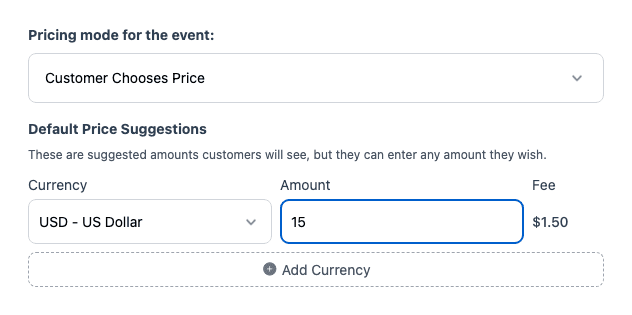
Set one price, a price in each currency, or let fans choose what they pay. Pass the fees on to buyers or sell the video download as an add-on, and the money goes straight to your Stripe account.

How ticket sales work

Any time, on any screen

Fans open your link in any browser with no app or account, on a phone, a laptop or the TV with AirPlay or Chromecast. A ticket is for one viewing device at a time.

Watching on a TV
A woman at a kitchen island in the morning, watching a recorded concert on a tablet with a coffee in her hand

What organizers say

Pricing for on-demand videos

Each video you sell is an event, so it unlocks with an event credit or the Unlimited plan. Selling tickets adds a fee per ticket sold.

Event credits

Pay as you go
$59
$59 per event
5 events
$250
$50 per event
10 events
$400
$40 per event
25 events
$875
$35 per event
50 events
$1,500
$30 per event

Unlimited plans

AnnualSave $389/yr
$167
/month
Billed at $1,999/yr

Pay-per-view tickets

US $1.50

per ticket sold, plus Stripe's card processing fee

Set Up a PPV Event
  • Ticket money goes to your own Stripe account
  • Fixed or pay-what-you-want prices
  • Day passes, all-days passes and replays
  • No contract and no revenue split

Every event includes

  • 24 hours of Full HD streaming
  • Unlimited guests
  • Pause and resume to the same link
  • Play the music your event needs
  • Instant replay, online from 1 month to 10 years
  • Your own event link and page
  • Link to gift registries or donations
  • Photo guestbook or chat
  • Welcome message, cover photo or intro video
  • Automatic email reminders for guests
  • Guest emails with your logo
  • Embed the stream on your website
  • Optional password protection
  • Money-back guarantee
  • Invite by CSV, link or email
Compare business streaming platforms

Selling a catalog of shows?

Tell us about your recordings and we’ll reply by email. You can create your account and set up your first show in the meantime.

  • Prices for fans in other countries
  • Moving videos from another platform
  • Selling a season of shows

Rather start now? Create a free business account

Frequently asked questions

Any video you have the rights to sell: a concert film, a recorded show, a recital or a festival set. Upload it as an MP4 or MOV file of up to 200 GB in Manage Video, in the EventLive web app at broadcaster.eventlive.pro.

Fans pay by card on your event page, and the money goes to your own Stripe account. Stripe pays it out to your bank on your account's schedule. How ticket sales work

Each video you sell is an event, so it unlocks with an event credit or the Unlimited plan. Each ticket sold adds EventLive's ticket fee and Stripe's card processing fee, and you can pass both on to buyers. The prices are in Pricing below.

Yes. Upload a trailer or a highlight as a free preview, before the show. Everyone can play it on your ticket page, and ticket holders get the whole video.

Yes. Add each part where it belongs, and they play as one video in that order. You can trim the ends of a part, rename, replace or download it, and restore a removed part for 30 days.

As long as the video is online. Events stay online for 30 days by default, and you can extend that to 1 year or 10 years in the app. On a business subscription, videos stay online while the subscription is active.

A ticket is for one viewing device at a time. Opening it on another device can disconnect the first one.

Only if you sell it. Turn on the video download and buyers can add it to their ticket at checkout, at a price you set, to keep the video forever.

Yes. Add their email in Guest List & Invite and they watch without buying a ticket. The guest list

Yes, one event for each show. On a business account, every event can use the same Stripe account without connecting it again.

No. EventLive doesn't use automatic music detection or muting, and your video plays on your own event link, not a social feed. You still need the rights to the music, and we act on takedown requests from rights holders. Music and copyright

Yes. Download your original video files, create an event for each one and upload it as an on-demand video. Your trailers can come along as free previews.

Ready to sell your show on demand?

Create the event, upload the video and share one link.