

The short answer
There's no single best platform: it depends on who should watch. For a public event you want new people to find, use YouTube Live or Facebook Live. For a private event for invited guests, such as a wedding, funeral, graduation or company meeting, use a platform with a private link that guests open without an account, like EventLive. For a paid event, pick one with built-in tickets. For a meeting where everyone talks, use Zoom or Teams.
Most lists of the "best live streaming platforms" are written for gamers and creators building an audience. Streaming an event is a different job. The people watching usually know each other: the family at a wedding, the parents at a recital, the staff at a company meeting. What matters is that they can get in easily, that the right people can watch and the wrong ones can't, and that the stream holds up for the whole event.
This guide compares the platforms people use for events in 2026, from free social platforms to private event links, meeting software and video hosts. We make EventLive, one of the platforms below, so we've stuck to what each one is built for and where it falls short, including us.
Start with who should watch
The audience decides most of the answer.
| Your event | What to look for |
|---|---|
| Public, and you want new people to find it | A social platform where people already browse |
| For invited guests: a wedding, funeral or family celebration | A private link guests open with no account or app |
| For members, staff or students | A password, an invite list or name and email first |
| People pay to watch | Tickets on the event page, paid to your own account |
| Everyone needs to talk | Meeting software, where everyone joins a call |
If you're not sure, think about the least technical person you want watching. A grandparent who has never used Facebook, or a client who doesn't want an account anywhere, will tell you a lot about what the platform has to do.
Five questions to ask any platform
- Can viewers watch without an account or an app? Every sign-up step loses some of your audience.
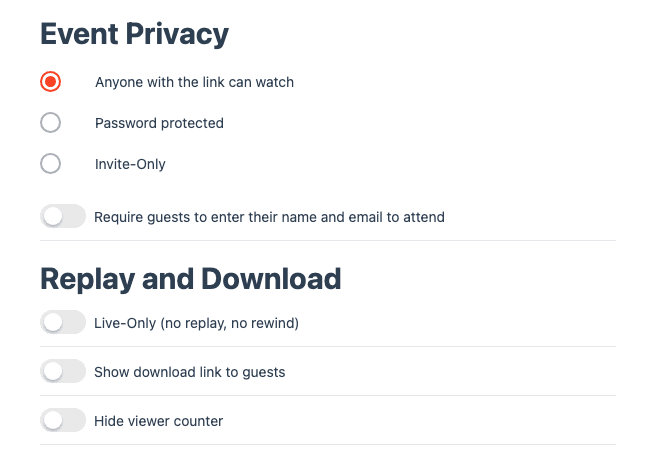
- Who can get in, and how do you control it? Look for passwords, invite lists or registration, not just "unlisted".
- How will you film it? A phone on a tripod, a computer with your slides, or your AV team's encoder. Check that the platform takes the one you have.
- What happens after the event? A replay on the same link, a download of the video, and how long it stays online.
- How do you pay? Free with ads, a monthly subscription, or a price per event. A subscription only makes sense if you stream often.
The platforms compared
| Platform | Best for | Watch out for |
|---|---|---|
| EventLive | Private and ticketed events: weddings, funerals, recitals, tournaments, company meetings | No multistreaming to social platforms, no polls or votes |
| YouTube Live | Public events you want people to discover | Ads and suggested videos, copyright muting, phone streaming needs a following |
| Facebook Live | Events for an audience that's already on Facebook | Private groups need every viewer to have an account |
| Zoom or Teams | Meetings and workshops where everyone talks | Everyone joins a call, and large audiences need a bigger plan |
| Vimeo | Organizations that publish video all year | A subscription, even in months you don't stream |
| BoxCast | Churches, schools and teams that broadcast every week | Built around a subscription and its own hardware |
| Dacast | Teams with an encoder and a website to stream on | More setup: channels, players and paywall configuration |
| Restream | Sending one stream to several social platforms at once | Viewers watch on those platforms, under their rules |
| Twitch or TikTok LIVE | Creators building a public following | Public by design, and not built for private events |
The platforms, one by one
EventLive
EventLive is built for streaming one event to the people who care about it. You get a private event link, and guests open it on a phone, tablet or computer with no app and no account. You choose who can watch: anyone with the link, a password, an invite list, or name and email first.
- Filming: stream from the EventLive app on a phone, from EventLive for Mac or Windows with your slides and cameras, or from any encoder over RTMP.
- Guests: they leave messages in the guestbook or chat, and the replay plays on the same link afterwards.
- Tickets: connect your Stripe account to sell tickets, day passes or the replay, and the money goes to you.
- Bigger events: stream up to 10 rooms on one link, and add your own logo with a business account.
It isn't a social network, so nobody finds your stream by browsing. It can't send your stream to YouTube or Facebook at the same time, and it doesn't run polls or votes. Test streams are free, and you pay per event or choose a plan if you stream often. How EventLive works
YouTube Live
YouTube is free and has the biggest audience in the world, which makes it the best choice for public events you want new people to find: talks, open concerts, public meetings. A stream can be public, unlisted or private.
For private events it's a weaker fit. An unlisted link works for anyone it's passed to, and viewers see ads and suggested videos around your stream. Copyrighted music in the background, such as the first dance at a wedding, can get the stream muted or blocked. Streaming from the YouTube app on a phone also needs a minimum number of subscribers. EventLive vs YouTube Live
Facebook Live
Facebook Live is free and easy if your audience already uses Facebook every day, for example a community group or a local club. People get a notification and watch in the app they already have.
The trouble starts when the event is private. A private group means every viewer needs a Facebook account and has to be let in, and many older relatives and business guests don't have one. Copyrighted music can be muted here too. EventLive vs Facebook Live
Zoom or Microsoft Teams
Meeting software is the right tool when everyone needs to speak: workshops, board meetings, interviews, a family call. Everyone joins the call, can turn on their camera, and the host manages the room.
For a broadcast it gets in the way. Every viewer joins a call, someone has to look after microphones, and the free plan limits how long a meeting runs. Large audiences need a bigger plan or a webinar license. Many events use both: they stream the room to a private link and bring remote speakers in through Zoom. Adding remote speakers
Vimeo
Vimeo is a video hosting platform with live streaming built in. It suits companies and creators that publish and embed video all year, and want one place for their whole library.
You pay a monthly or yearly subscription, whether you stream that month or not, so it's more than most people need for a handful of events a year. EventLive vs Vimeo
BoxCast
BoxCast is popular with churches, schools and sports programs that broadcast every week, often with its own camera and encoder hardware installed. Viewers don't need an account.
It's built around a subscription, which makes sense for weekly services and less for a single wedding or memorial. EventLive vs BoxCast
Dacast
Dacast is a streaming platform for teams that already run an encoder and want to stream onto their own website, with options for paywalls and video on demand.
Expect more setup than an event link: channels, players and payment settings, all on a subscription. EventLive vs Dacast
Restream
Restream doesn't host your viewers itself. It takes one stream and sends it to YouTube, Facebook, LinkedIn, Twitch and other platforms at the same time, which suits brands that want to reach their followers everywhere at once.
Viewers watch on those platforms, so their privacy settings, ads, comments and copyright rules apply. EventLive vs Restream
Twitch and TikTok LIVE
Twitch and TikTok LIVE are made for creators who stream often and grow a following: gaming, music, chat. They're public by design. For a wedding, a memorial or a company meeting, they're the wrong place.
Free or paid: what you're paying for
Free platforms aren't really free: you pay with ads around your stream, with your viewers' data, or with the work of getting everyone signed up. That's a fine trade for a public event you want seen.
For a private event you usually pay for three things: a private link that keeps the event among the people you invited, no ads or suggested videos next to it, and support when something goes wrong on the day. Check how a platform charges before you commit. A price per event suits one wedding or one conference; a subscription suits a church or a school that streams every week. EventLive pricing
Before you decide
Before you choose a platform
Whatever you choose, test it where the event happens, on the same internet connection, a few days before. That's when you find out whether the platform suits your event, while there's still time to switch. How to run a live streaming test
“No accounts or special apps needed for guests to attend. No complaints about streaming quality from guests, even when streaming over mobile signal. Much better format than Zoom not having to worry about muting attendees, and no minimum followers to stream like YouTube.”