


Vimeo is closing Vimeo On Demand, its storefront for selling and renting videos. If you've been using it to sell recordings of concerts, performances, workshops, conferences or ceremonies, you need a new home for that content, and soon.
In this article we explain what's changing at Vimeo, what to look for in a replacement, and why EventLive is a good fit for event-based video: it's easy to set up, you pay per event instead of a monthly fee, and ticket sales go straight to your own Stripe account.
What's Happening to Vimeo On Demand?
Vimeo has announced that Vimeo On Demand is shutting down in stages:
- August 22, 2026: new uploads to On Demand stopped.
- September 21, 2026: new purchases, rentals and subscriptions stopped. Existing subscriptions will not renew.
- September 24, 2026: final seller payouts.
- November 20, 2026: On Demand closes for good. Storefronts and purchase pages go offline, and buyers lose access to what they bought.
Your videos stay in your Vimeo account, but you can no longer sell them there. Vimeo points sellers to Vimeo OTT, a subscription-channel product built for ongoing streaming services, with monthly platform fees to match. That's a lot of product if all you want is to sell access to an event video now and then.
Need a new place to sell your event videos?
Set up a ticketed event page in about 5 minutes.
Try EventLive FreeWhat to Look for in a Vimeo VOD Alternative
Most people who used Vimeo On Demand weren't running a Netflix-style channel. They were selling one video at a time: a recital, a school play, a church concert, a training session or a conference recording. For that, a replacement should:
- Be quick to set up, without building a website or a channel.
- Charge only when you use it, not a monthly fee in the months you have nothing to sell.
- Pay you directly, instead of holding revenue until the next payout cycle.
- Handle both live and recorded video, so you can sell the live stream and the replay from the same page.
- Control access, so a ticket link can't be passed around freely.
Why EventLive Is a Great Vimeo VOD Alternative
1. Easy Setup, No Technical Skills Needed
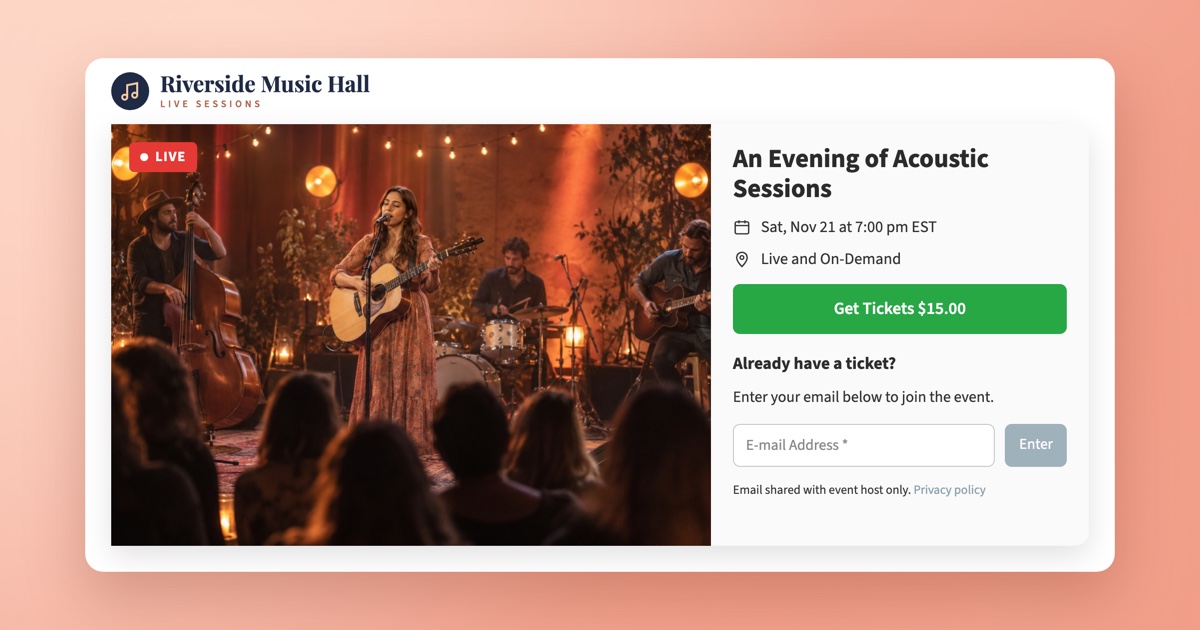
With EventLive you create a branded event page in a couple of minutes from the Broadcaster or the EventLive app for iOS and Android. Add your event name, date, cover photo and logo, and you have a page ready to share.
You can upload a recorded video to the event, go live from your phone, or stream from a professional setup over RTMP (OBS, vMix, ATEM and similar). After a live stream the replay stays on the same page, so viewers who bought a ticket can watch it later.
2. Pay Per Event, No Subscription
EventLive is priced per event. You buy an event credit when you need one, and there's no monthly plan to keep paying between events.
- A single business event starts at $59, and credit packs bring the per-event price down further.
- Credits don't expire, so a pack bought for this season still works next year.
- Each event includes unlimited concurrent viewers and Full HD streaming up to 24 hours.
If you only sell a handful of videos a year, paying per event usually costs much less than an OTT subscription.
3. Ticketing Through Your Own Stripe Account
EventLive's ticketing runs on Stripe. You connect your own Stripe account, or create one in a few clicks, set a ticket price, and viewers pay on Stripe's checkout page. Money goes directly to your Stripe account, so you're not waiting for a platform payout.
- EventLive charges a flat $1.50 per ticket, plus standard Stripe processing fees.
- Set a fixed price, or let viewers choose what to pay for fundraisers, with an optional minimum and suggested amount.
- No passwords or access codes. Only ticket holders can watch, one device at a time.
- Viewers can buy from anywhere in the world.
For step-by-step instructions, see our guide on how to sell tickets to your live stream events.
4. Your Brand, Your Website
Every event page carries your logo and cover photo, and you can embed the video and ticketing on your own website. Viewers buy and watch without leaving your site.
5. Real People Helping You
Moving platforms is stressful, especially on a deadline. EventLive includes unlimited email and chat support from real people, so if you get stuck setting up your first event, we're here to help.
Vimeo On Demand vs EventLive at a Glance
- Availability: Vimeo On Demand closes on November 20, 2026. EventLive is available now.
- Pricing: Vimeo On Demand required a paid Vimeo plan. EventLive is pay per event, with no subscription.
- Ticket fees: Vimeo took a revenue share. EventLive charges a flat $1.50 per ticket plus Stripe fees.
- Payouts: Vimeo paid sellers periodically. With EventLive, payments go directly to your Stripe account.
- Live streaming: Not part of Vimeo On Demand. EventLive streams from the phone app or over RTMP, with a replay on the same page.
- Setup: Vimeo needed a storefront. An EventLive event page takes about 5 minutes.
How to Move Your Paid Videos to EventLive
- Download your videos from Vimeo before November 20, 2026, so you have the original files.
- Create a free EventLive account and add your business name and logo.
- Create an event for each video you want to sell, and upload the recording.
- Connect Stripe in the Sell Tickets section of the event settings and set your price.
- Share the new link with your audience, or embed it on your website.
If you had customers who bought videos on Vimeo On Demand, let them know where your content lives now. Their Vimeo access ends on November 20.
Frequently Asked Questions
Is Vimeo shutting down completely?
No. Only Vimeo On Demand, the storefront for selling and renting videos, is closing. Regular Vimeo hosting continues.
Do I need a subscription to use EventLive?
No. You pay per event. Credit packs lower the per-event price, and credits don't expire.
How much does it cost to sell tickets?
EventLive charges $1.50 per ticket sold, plus Stripe's standard processing fees. You set the ticket price.
How do I get paid?
Ticket payments go directly to your connected Stripe account, and Stripe pays out to your bank on its normal schedule.
Can I sell both a live stream and the replay?
Yes. Viewers with a ticket can watch live and come back to the replay on the same event page.
Which countries are supported?
Viewers can buy tickets from anywhere. To receive payments, you need a Stripe account in one of Stripe's supported countries.
Conclusion
Vimeo On Demand's closure is a good moment to rethink how you sell event video. If you sell recordings and live streams event by event, you don't need a monthly OTT platform. EventLive gives you a branded page in minutes, pay-per-event pricing with no subscription, and Stripe ticketing that pays you directly.
Create your free EventLive account and set up your first event today.
.png)

