
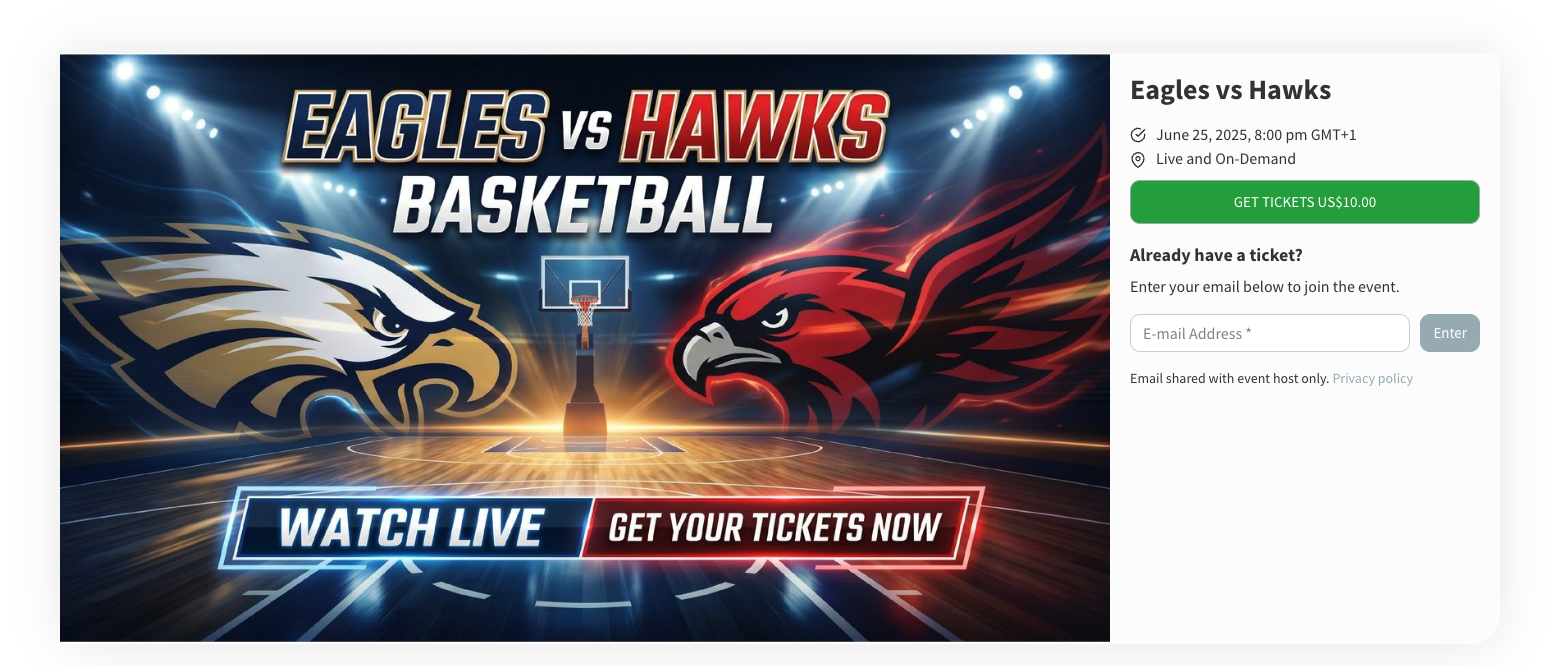
Sports events are made for live streaming. There is movement, emotion, family pride, and a clear reason for people to tune in even when they cannot be there in person.
For leagues, schools, tournaments, clubs, and gyms, there is another opportunity too: ticket sales. A live stream can help parents, grandparents, alumni, and fans watch from anywhere while creating a new revenue stream for the organization.
The good news is that you do not need a broadcast truck or a complicated production team to live stream a sports event with ticket sales. In many cases, you can start with a smartphone, a tripod, a stable internet connection, and a platform that handles pay-per-view access for you.
In this guide, we will walk through how to set up a ticketed sports live stream, what equipment you need, how much to charge, and how to make the viewing experience easy for fans.
Why Sell Tickets to a Sports Live Stream?
Most sports organizations already have an audience that cares deeply about the game. The challenge is that not everyone can attend in person.
Ticketed live streaming helps you reach people who are already interested:
- Parents who are traveling or working during the game.
- Grandparents and relatives who live far away.
- Fans who cannot get to the venue.
- Alumni who still follow the team.
- Athletes who want to watch the replay later.
- Coaches, scouts, or supporters who want easy access to the event online.
This is especially useful for tournaments, championship games, martial arts competitions, dance and cheer events, wrestling meets, volleyball tournaments, little league games, and high school sports.
Instead of asking families to travel, you give them a simple way to watch. Instead of relying only on in-person ticket sales, sponsorships, or fundraising, you create another source of revenue around an event you are already hosting.
What You Need to Live Stream a Sports Event with Ticket Sales
You can make the setup as simple or as advanced as you want. For many sports events, the basic setup is enough.
Simple setup:
- A smartphone or tablet with a good camera.
- A tripod or stable mount.
- A reliable internet connection.
- A power bank or charger.
- A live streaming platform with ticket sales.
Optional upgrades:
- An external microphone for announcements or commentary.
- A second camera angle for larger tournaments.
- A laptop and RTMP setup for more advanced production.
- A scoreboard camera or on-screen graphics.
- A volunteer camera operator who understands the sport.
If you are just getting started, keep it simple. A steady stream that fans can easily access is more valuable than a complicated setup that is hard to manage.
Step 1: Choose a Platform That Supports Ticket Sales
The most important decision is where the stream will live. Free social platforms can work for casual broadcasts, but they are not built for ticketed sports events.
If you want to sell tickets, your platform should include:
- A private event page.
- Built-in payment or pay-per-view access.
- A simple checkout experience for viewers.
- Replay access after the event.
- Viewer access control so only ticket holders can watch.
- Support for streaming from a phone or RTMP setup.
EventLive has a dedicated page for sports live streaming with pay-per-view ticketing, which is a good fit for tournaments, leagues, competitions, and games where families and fans are willing to pay for remote access.
You can also read our full guide on how to sell tickets to your live stream events if you want a more detailed walkthrough of the ticketing setup.
Step 2: Set a Ticket Price That Makes Sense
Pricing depends on the event, the audience, and how much value the stream provides.
Common pricing options:
- $5 to $10 for a regular season game or single match.
- $10 to $20 for playoffs, finals, recitals, or tournament days.
- $25 to $50 for multi-day tournament access.
- A season pass for families who want to watch every game.
- Donation-style pricing for fundraisers or nonprofit teams.
Do not overthink the first event. Start with a price that feels affordable for families and useful for your organization. After a few streams, you can adjust based on demand, viewer feedback, and the type of event.
A simple rule: if people would pay for parking, concessions, or an in-person ticket, many will pay a reasonable amount to watch remotely.
Step 3: Connect Payments
Ticket sales need to be easy for both the organizer and the viewer. You should not have to manually collect payments, send passwords, or check a spreadsheet before letting people watch.
The best setup is a simple checkout flow:
- The organizer creates the sports event.
- The organizer sets the ticket price.
- The viewer opens the event link.
- The viewer pays online.
- Access is granted automatically.
Many ticketed streaming systems use a payment processor like Stripe to handle secure online payments. This keeps the process familiar for viewers and helps organizers avoid manual payment work.
Before the event, make sure your payment account is connected and tested. It is much easier to fix payment setup two days before the tournament than five minutes before the first whistle.
Step 4: Test Your Internet Connection at the Venue
Sports venues can be tricky. Gyms, fields, arenas, and school buildings do not always have strong internet where the camera needs to be.
Before you sell tickets, test the connection from the exact location where you will stream.
Check these things:
- Upload speed, not just download speed.
- Mobile signal strength at the camera position.
- WiFi performance when the venue is full.
- Whether the venue network blocks streaming.
- Whether you have a backup hotspot or second carrier available.
Use a speed test tool like Speedtest from the location where the camera will be placed. For most simple HD sports streams, you want a stable upload speed of at least 5 Mbps. More is better, especially for fast-moving sports.
If the connection is weak, try a different spot, a different carrier, venue WiFi, or a dedicated hotspot. The stream can only be as reliable as the connection behind it.
Step 5: Choose the Best Camera Position
Sports live streaming is different from streaming a ceremony or presentation. The action moves quickly, and viewers need to understand what is happening on the court, field, mat, or rink.
Good camera placement should:
- Show as much of the playing area as possible.
- Avoid being blocked by players, coaches, or spectators.
- Stay safe from balls, equipment, and foot traffic.
- Be high enough to see the action clearly.
- Be close enough that viewers can identify what is happening.
- Allow the camera operator to follow the play without constant fast zooming.
For basketball, volleyball, wrestling, and martial arts, a slightly elevated side angle usually works well. For baseball, softball, and soccer, a wider angle is often better because the field is larger.
If you are streaming with one camera, choose clarity over creativity. Viewers care more about following the game than seeing dramatic angles.
Step 6: Make the Event Page Easy to Understand
The event page is where ticket sales happen, so it should answer the viewer's basic questions quickly.
Include:
- Team or event name.
- Sport and age group or division.
- Date and start time.
- Time zone.
- Ticket price.
- What the ticket includes, such as live access, replay access, or full tournament access.
- A cover photo that matches the event.
- Any notes about schedule changes or delays.
Do not make families guess. If the ticket gives access to one game, say that. If it includes all matches from a tournament day, say that too.
Step 7: Promote the Stream Before Game Day
Ticket sales depend on promotion. Even the best live stream will not sell if nobody knows it exists.
Good places to share the link:
- Team emails.
- League newsletters.
- Parent group chats.
- School or club websites.
- Social media pages.
- Tournament registration emails.
- Printed signs at the venue with a QR code.
Start promoting early. Share the link when the schedule is announced, again the day before, and once more shortly before the event starts.
If this is your first ticketed stream, explain what families are buying. For example: "Can't make it to the tournament? Buy a live stream ticket and watch from anywhere. Replay included after the event."
Step 8: Go Live Early and Monitor the Stream
Start the stream before the game begins. This gives viewers time to join and gives you time to catch small issues.
Before the first play:
- Make sure the phone or camera is charged.
- Clean the camera lens.
- Confirm the tripod is stable.
- Check that the stream is live on a second device.
- Listen for audio.
- Make sure the scoreboard or playing area is visible if possible.
- Confirm that ticketed viewers can access the stream.
During the game, avoid unnecessary changes. Do not switch networks, rotate the phone, or move the camera unless you have to. A stable stream is better than a stream that keeps changing.
Step 9: Use the Replay to Keep Selling Value
A sports live stream does not stop being valuable when the game ends.
Replay access gives families and athletes another reason to buy:
- Parents can watch after work.
- Athletes can review their performance.
- Relatives in other time zones can watch later.
- Coaches can share moments with the team.
- Fans can rewatch finals, goals, routines, or matches.
Mention replay access in your promotion if it is included. For busy families, the replay can be just as important as the live broadcast.
Common Mistakes to Avoid
Ticketed sports streaming is simple once the system is set up, but a few mistakes can hurt the viewer experience.
Avoid these:
- Selling tickets before testing the internet connection.
- Using a public social media stream when you need paid access.
- Forgetting to explain what the ticket includes.
- Setting the camera too low or too close to the action.
- Starting the stream at the exact start time instead of a few minutes early.
- Letting the device run on battery without a charger nearby.
- Ignoring privacy and consent when streaming youth sports.
These are all easy to avoid with a short test, a clear event page, and a simple backup plan.
Frequently Asked Questions
Can I sell tickets to a youth sports live stream?
Yes. Many leagues, clubs, schools, and tournament organizers sell tickets to sports live streams. Make sure you have the right platform, clear privacy policies, and any permissions required by your organization.
How much should I charge?
For many community sports events, $5 to $15 per game is a reasonable starting point. Tournaments, finals, and multi-game access can be priced higher. The best price depends on your audience, event type, and what the ticket includes.
Do viewers need an account?
Ideally, no. For the best viewer experience, choose a platform where fans can open the event link, buy a ticket, and watch without a complicated setup.
Can I stream with just a smartphone?
Yes. A smartphone on a tripod is enough for many sports events. The most important pieces are a steady camera position, good internet, and a simple ticketing experience.
What if the internet is weak?
Test before the event and prepare a backup. A mobile hotspot, second carrier, or different camera location can save the stream if venue WiFi is unreliable.
Final Thoughts
Live streaming a sports event with ticket sales is one of the simplest ways to reach more fans and create new revenue from games, tournaments, and competitions.
Start with the basics: choose a ticketed streaming platform, test the internet, set a fair price, create a clear event page, and promote the link before game day.
You do not need to make the first stream perfect. You just need to make it easy to watch, easy to buy, and reliable enough that families want to come back for the next game.
Once you get the system working, every sports event becomes more than something people can only attend in person. It becomes a broadcast that families can watch from anywhere, and a revenue opportunity your organization can build on season after season.
.png)